n8n vs Make vs Zapier
n8n, Copilot Studio, Make, or Zapier: Which Should You Choose?
Compare n8n, Microsoft Copilot Studio, Make, and Zapier by what they can do, how well they connect to internal systems, how much control they offer, and their total cost.
Contents
The short answer: choose Microsoft Copilot Studio when your company is deeply invested in Microsoft and needs centrally governed agents, n8n when self-hosting, internal APIs, and technical control are decisive, Make when operations teams need to see complex branching and data mapping, and Zapier when you want to connect standard SaaS applications in a clear business workflow quickly.
This is not a universal ranking. All four products can connect applications and use AI, but they start from different assumptions and meter work differently. The right choice follows your existing systems, data sensitivity, identity model, approval boundary, and the team that will resolve production failures.
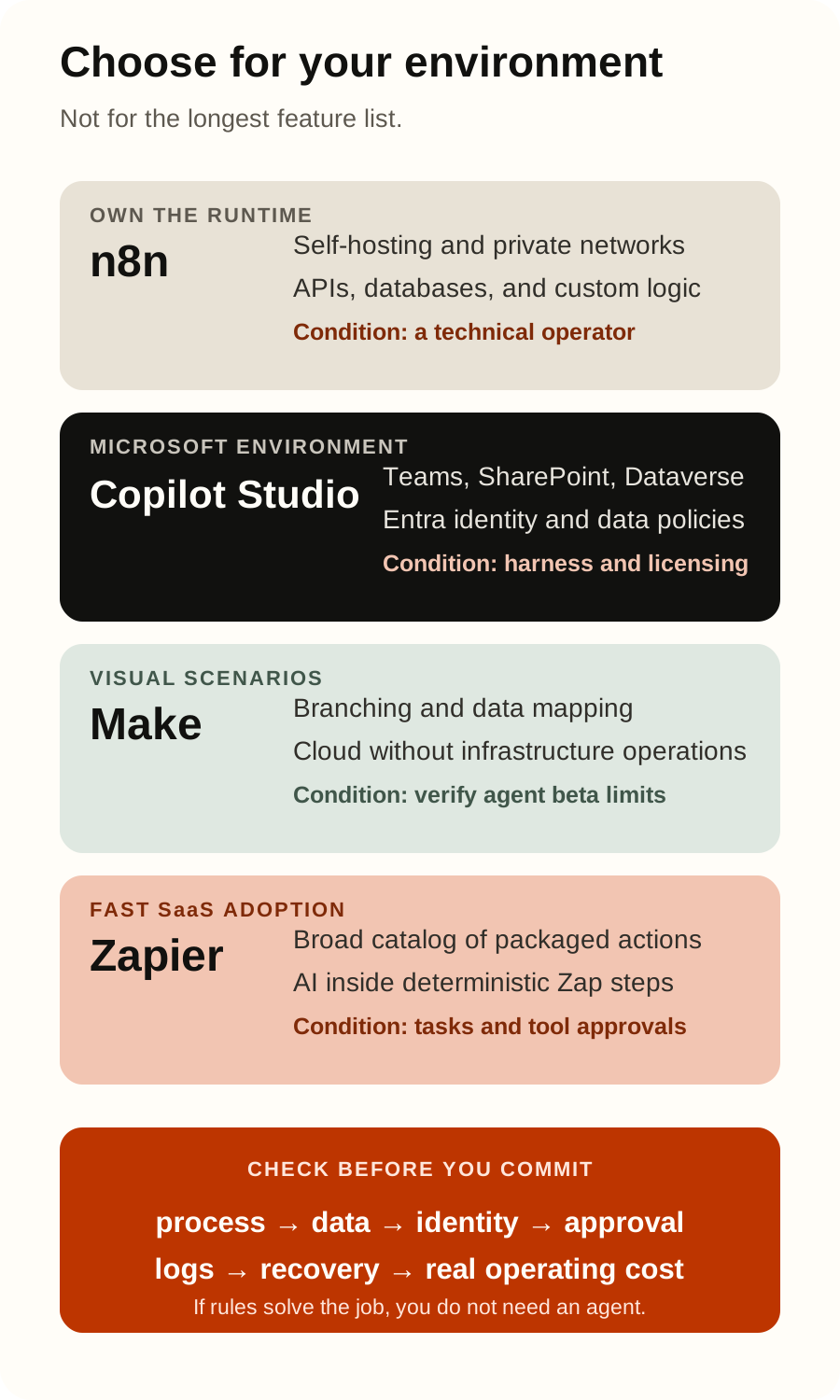
Quick decision
| Platform | Strongest reason to shortlist it | Be cautious when |
|---|---|---|
| Microsoft Copilot Studio | Microsoft 365, Teams, SharePoint, Dataverse, Dynamics 365, Entra identities, and Power Platform governance are already standard | Licensing, Copilot Credits, and harness differences have not been modeled on the actual process |
| n8n | You need self-hosting, a private network, direct APIs, custom nodes, or a choice of model providers, and you have a technical owner | Nobody owns security, upgrades, databases, scaling, monitoring, and recovery for the self-hosted system |
| Make | An operations team wants a visual scenario with branches, filters, and data transformations without operating the infrastructure | You assume its on-premise agent means the entire Make platform runs on your infrastructure, or use an agent beta for high-stakes decisions |
| Zapier | Fast adoption and a broad catalog of standard SaaS actions matter most, and the workflow is easy to express as Zap steps | Complex, long-running, or high-risk logic is hidden inside one dynamic AI step without limits and review |
| None | An existing system already provides a reliable workflow, or a core transaction requires a custom integration | You are buying another platform only because the process has been labeled an “AI agent” |
If rules can fully describe the process, start with a conventional workflow. Add an agent only to the part that must interpret unstructured content, evaluate context, or choose among several permitted tools. Our AI agent vs chatbot vs automation guide explains that boundary in detail.
These are not four identical products
n8n, Make, and Zapier historically start with triggers, steps, and integrations. Microsoft Copilot Studio starts with agents, conversations, knowledge, and tools, although its current documentation now includes workflows and agent flows in the same graphical studio. In a Microsoft environment, a shortlist for purely deterministic automation should often include Power Automate as well, while Copilot Studio becomes relevant when the agent or conversational layer is a real requirement.
It is equally important to distinguish a base platform from its agent layer. Make AI Agent (New) is currently labeled open beta. In July 2026, Zapier announced that its standalone Agents product was moving into AI by Zapier inside the Zap editor. A feature name and the place where an agent is built can change much faster than your business process.
n8n: control and self-hosting with real operating responsibility
n8n can run on your own infrastructure, on premises, or in a private cloud, and n8n Cloud is also available. This is the clearest distinction in this group when network or data policy requires you to choose where the execution layer operates. The Community edition supplies the core self-hosted product, while collaboration, environments, Git-based control, and advanced administration vary by commercial edition.
For AI workflows, n8n supports multiple model providers, tools, and memory. Its AI Agent node connects a model to one or more tools and lets the agent select the tool to call. If a packaged integration is insufficient, you can use HTTP/API steps or build a custom node.
Self-hosting is not a security control by itself. n8n’s own instance security guidance covers SSL, SSO or 2FA, key rotation, risky-node blocking, SSRF protection, public API restrictions, and execution-data redaction. Someone in the organization must own updates, secrets, the database, backups, queues, monitoring, and incident response.
Choose n8n when a technical team needs control of the runtime and direct integration with internal APIs or databases. Do not choose it only because it says self-hosted if you do not have people able to operate that infrastructure reliably.
Microsoft Copilot Studio: Microsoft ecosystem, identity, and governance
Microsoft Copilot Studio is currently a graphical low-code environment for building and managing agents and workflows. Agents use instructions, knowledge, and tools, and can be published to Teams, Microsoft 365 Copilot, websites, and other supported channels. Workflows and agent flows can combine predictable automation, AI, and human review.
Power Platform connectors cover Microsoft and external services, while custom connectors expose a public API. Tools can operate with a user’s identity or, with careful configuration, maker-provided credentials. This is a strong starting point when the company already manages Entra identities, Power Platform environments, SharePoint, Dataverse, and Dynamics.
The main distinction is not merely connector count; it is the administration layer. Microsoft data policies for agents can require authentication and block particular knowledge sources, connectors, HTTP endpoints, triggers, and publication channels. Environments separate data boundaries, roles, and development lifecycles.
Copilot Studio is also not one interchangeable runtime. Microsoft documents a GitHub Copilot harness, standard harness, and Copilot chat harness, each intended for different work and billing behavior. Standard and GitHub Copilot harness agents cannot simply be converted into one another later, so validate this decision early.
Licensing must be calculated from the actual design. Copilot Studio access and capacity depend on the plan, channel, connectors, harness, and Copilot Credit consumption. Choose Copilot Studio when Microsoft identity, data, channels, and governance already form the core of the process. Otherwise, you may be buying more platform and licensing complexity than a simple workflow requires.
Make: visual mapping for more complex operational flows
Make presents a scenario as a visual network of modules, routes, and filters. That suits teams that want to see how data branches, transforms, and moves through several applications. Its current plans page lists more than 3,000 standard applications, custom applications, API access, and execution monitoring, with capabilities varying by plan.
Make AI Agent (New) runs inside scenarios and can use modules, other scenarios, MCP tools, and knowledge files. Make explicitly recommends a standard scenario for predefined logic, a bounded AI step for structured input and output, and an agent for variable tasks that require judgment. The same documentation marks the feature as open beta and advises against using it for tasks involving sensitive data, high-stakes financial or strategic decisions, or strict legal requirements.
Make is a managed cloud platform. Its on-premise agent, available for Enterprise customers, can reach internal HTTP APIs on a local network without exposing inbound access through the firewall, but it is not a self-hosted edition of the whole Make platform. Confirm that distinction with IT and security before promising local processing. Make organizations choose an EU or US data region, and the selected region cannot be changed after the organization is created. Decide it deliberately during setup.
Choose Make when a complex data flow is easier to maintain on a visual canvas and you do not want to operate workflow infrastructure. Verify the beta agent boundary, execution-data retention, region, and network path to internal systems.
Zapier: fast SaaS adoption and an agentic step inside a Zap
Zapier is strong when a process consists of known triggers and actions in standard cloud applications. Its current plans page lists more than 9,000 application connections. An internal system can be reached through webhooks, API requests, or a private integration.
One current change matters: from July 15, 2026, Zapier is migrating standalone Agents to AI by Zapier inside the Zap editor. Agentic reasoning and dynamic tool calls can now be one step between deterministic Zap steps. A builder can require approval per tool, define structured output, and inspect tool calls in Zap history. It is therefore more accurate to discuss agentic automation in Zapier than to treat the old Agents site as a stable separate platform.
Zapier offers Enterprise controls for permitted applications and actions, but confirm the exact behavior for API tools, private applications, and the new agentic step. Its documentation notes that approval is off by default for a newly added AI tool; enable it for any tool that creates, changes, or deletes data. Zapier documents US hosting for customer and processed data, so organizations with residency constraints should evaluate that data path explicitly.
Choose Zapier when a nontechnical team needs to automate common SaaS processes quickly and each action can remain a bounded, visible step. Measure reliability and task consumption before placing complex core logic or many dynamic calls inside one AI step.
The same business process on all four platforms
A comparison becomes useful only when every candidate solves the same case. Consider inbound invoice processing: a document arrives, AI extracts and classifies data, the system looks up the purchase order, a person approves an exception, and the ERP receives only a validated action.
| Platform | What the pilot might look like | What to prove first |
|---|---|---|
| Copilot Studio | SharePoint or another source, a connector or agent flow, a Dataverse/ERP tool, and human review in the Microsoft environment | Entra identity, DLP policy, permitted connectors, harness, and Copilot Credits |
| n8n | A cloud or private-network workflow, a parser/model as a bounded step, an internal API or database, and a separate approval step | Operational ownership, secrets, network rules, idempotent writes, security audit, and rollback |
| Make | A visual scenario with modules, routes, and mapping; an agent only for an unstructured exception; the on-premise agent if the Enterprise network case requires it | The actual connector, credit count, beta boundaries, logs, and path to the internal API |
| Zapier | A SaaS trigger, AI by Zapier for a bounded judgment, an app/private integration for the ERP, and approval before a write | Task consumption, connected-app permissions, per-tool approval, and retry behavior |
The model should not approve payment on any platform. AI can extract data, flag an exception, and assemble evidence; an authorized person and the ERP still make and enforce the business decision. The AI invoice processing automation guide covers the end-to-end flow, while connecting AI agents to internal systems explains the integration architecture.
Cost: executions, credits, tasks, and Copilot Credits are not equivalent
Do not compare subscription prices alone. Each platform defines consumption differently:
- Current n8n plans meter a complete workflow execution rather than every step, with separate infrastructure and model costs for self-hosting.
- Current Make plans use credits for module actions, while agentic work can add dynamic consumption based on operations and AI tokens.
- Current Zapier plans count successful actions as tasks; AI by Zapier model tiers and dynamic tool calls can apply additional task multipliers.
- Copilot Studio billing is not one universal meter: the GitHub Copilot harness uses Copilot Credits, eligible Microsoft 365 Copilot users can have zero-rated standard-harness use in Microsoft 365 channels, and Copilot chat can be included in a Microsoft 365 Copilot license or billed by consumption.
Build a table for 100 representative cases: runs, steps, agent calls, tokens, retries, human reviews, and failed attempts. Then add licenses, hosting, observability, maintenance, and human time. Our AI agent cost and ROI calculator helps compare the process, but the real vendor bill must come from pilot execution records.
Ten checks before choosing
- Draw one process from trigger to measurable outcome.
- List the real applications, APIs, databases, and network boundaries, not only catalog logos.
- Decide whether each action executes as the user or as a separate service identity.
- Classify data the workflow reads, sends to a model, records, and retains.
- Mark the steps that must remain deterministic.
- Require human approval before sending, changing, deleting, paying, or granting access.
- Test normal cases, edge cases, duplicates, outages, and wrong model outputs.
- Verify logs, versioning, access revocation, replay, and safe rollback.
- Calculate usage in each platform’s own unit on the same case set.
- Assign a business owner and a technical owner before production.
When is “none of them” the better answer?
If your ERP, CRM, or service desk already has a maintained workflow with the required approvals, another orchestrator may only add a failure point. If a core process needs transactions, strict ordering guarantees, or very high throughput, a small custom service may be clearer than a visual flow. If a system has no API and can only be operated through a desktop interface, you may need RPA or a process change, which is a different decision from choosing an AI workflow platform.
The simplest reliable system is usually best: existing automation for stable rules, a bounded model step for unstructured content, and an agent only where adaptive decisions produce measurable value.
Frequently asked questions
Which tool is easiest to start with?
For common SaaS applications and a short workflow, Zapier often provides the shortest route to a first pilot. Make is easier to inspect when you want all branching and mapping on one canvas. Copilot Studio may be the fastest inside an already governed Microsoft tenant, while n8n is natural for a team comfortable with APIs and hosting. The easiest demo is not necessarily the easiest production system.
Can n8n be self-hosted?
Yes. Its official documentation supports your own infrastructure, on-premises deployment, and a private cloud. Your company then owns instance hardening, updates, availability, the database, backups, and monitoring.
Copilot Studio or Power Automate?
For a stable Microsoft process with predefined steps, evaluate Power Automate or a workflow/agent flow. Copilot Studio becomes more relevant when you need an agent, conversation, connected knowledge, dynamic tool selection, or publication through channels such as Teams and Microsoft 365 Copilot. Current Copilot Studio contains both agents and workflows, so tie the decision to a specific harness, license, and risk profile.
How does n8n compare with Power Automate?
n8n gives a technical team more direct control over hosting, APIs, custom nodes, and model providers. Power Automate is usually the more natural shortlist when Microsoft 365, Entra, Dataverse, Dynamics, and Power Platform governance already define the environment. Test the same process in both: connector behavior, identity, data location, approvals, recovery, and total operating cost matter more than the number of available actions.
Are Make and Zapier AI agent platforms or automation tools?
They are both. Their foundation is workflow automation, while agentic steps add dynamic decision-making and tool calls. Use a standard scenario or Zap for stable rules, and introduce the agent layer only where judgment justifies variability and additional cost.
Which platform is best for an internal ERP or CRM?
The platform that can reach the real system securely and provide the correct identity, least privilege, action trace, and error recovery. n8n is strong when you need a private network and API control; Copilot Studio when the system belongs to the Microsoft/Power Platform environment; Make and Zapier when a maintained connector, private API path, or suitable enterprise network mechanism exists. A connector catalog is not proof that the critical action works as required.
Do we need an AI agent or a conventional workflow?
If the same input should produce the same output under known rules, use a workflow. An agent is justified when it must interpret unstructured data, choose among several allowed tools, or adapt a plan after seeing results. Keep risky business decisions behind deterministic rules and human approval.
Recommended next step
Do not choose a platform in a sales presentation. Take one process and the same set of at least 100 normal and edge cases. For the two strongest candidates, measure quality, time, interventions, cost, action trace, and recovery. Begin with read-only access or mandatory approval before every change.
Use our 30-day AI implementation plan to prepare the pilot. If you want a neutral way to sort your own processes and select the first use case, start with an AI automation process assessment.
Official sources
- n8n — Host n8n
- n8n — Integrate AI
- n8n — Security
- n8n — Plans and pricing
- Microsoft Learn — Copilot Studio overview
- Microsoft Learn — Copilot Studio harnesses
- Microsoft Learn — Power Platform connectors as agent tools
- Microsoft Learn — Data policies for agents
- Microsoft Learn — Copilot Studio access and licensing
- Make — Introduction to Make AI Agent (New)
- Make — Organizations and data regions
- Make — On-premise agent
- Make — Plans and pricing
- Zapier — Migrating from Agents to AI by Zapier
- Zapier — Add tools to AI by Zapier
- Zapier — App access policies
- Zapier — Data privacy
- Zapier — Plans and pricing
Reviewed on August 31, 2026. Capabilities, beta status, product names, prices, usage metrics, and licensing change quickly. Recheck the linked official documentation before procurement and production rollout. Product names are used for neutral comparison and do not imply partnership or certification.