AI agent integration
How to Connect AI Agents to Internal Systems Safely
Learn how to connect AI agents to your CRM, ERP, email, and databases with limited access, clear rules, and human approval.
Contents
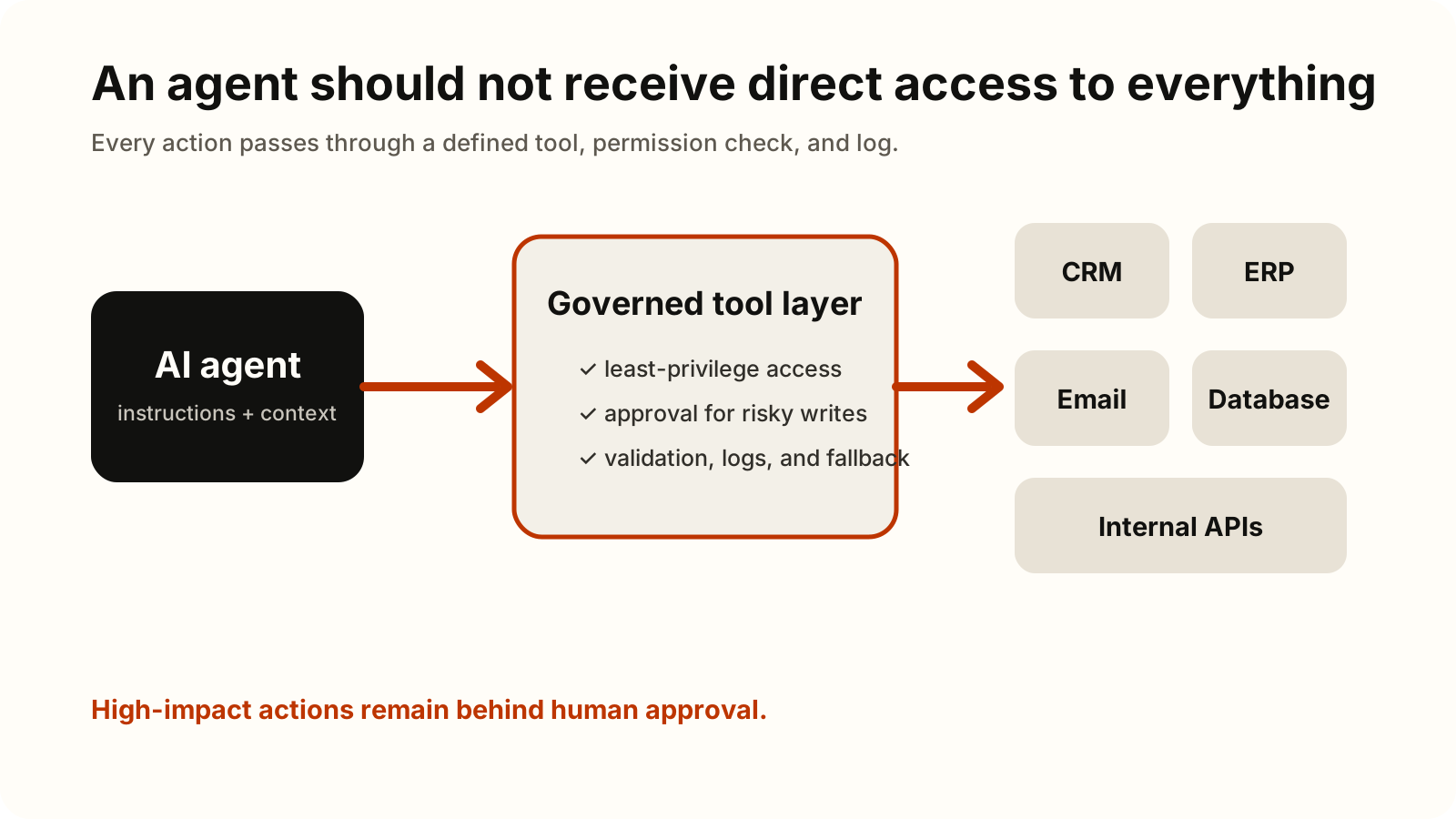
Connecting an AI agent to CRM, ERP, email, or a database is not primarily a model-selection exercise. It is a systems and authority design problem. The agent sits between a probabilistic model and systems that contain real customer records, financial data, messages, and operational state. A useful integration therefore needs a narrow purpose, explicit permissions, predictable failure behavior, and evidence of every important action.
Before adding a tool, determine who owns the process, which data the agent may read, which actions it may propose, and which actions require approval. This keeps the automation measurable and limits its possible impact when a model, integration, or upstream system behaves unexpectedly.
The same principle guides our work on integrating AI with internal systems, including CRM, ERP, APIs, webhooks, and MCP tools.
Start with one process, not every system
Choose a process with a clear input, output, owner, and success measure. “Help the sales team” is too broad. “Read a new website inquiry, find an existing CRM contact, prepare a draft reply, and ask the account owner to approve it” can be mapped and tested.
When the input is a shared inbox, the AI email automation guide covers events, triage, separate read and send permissions, and controlled draft review.
List every proposed action and classify it as read, draft, reversible write, or consequential write. Reading a customer record is different from changing its owner. Drafting an email is different from sending it. Creating an invoice is different from posting it to the ledger. Keep deterministic calculations, eligibility rules, and required approval sequences in ordinary code or workflows rather than asking a model to reproduce them from prose.
Choose the narrowest integration method
Different connection methods solve different problems. The right default is the smallest surface that reliably supports the process.
Supported connector
Use a platform connector when it supports the required service, fields, authentication method, and actions. Connectors reduce custom code, but their action coverage and update schedule still need verification. Microsoft’s current guidance distinguishes connectors for known services, MCP servers for custom or internal services, and workflows for deterministic multi-step work.
Direct API and webhook
Use a direct REST API when the system has a stable API and the integration is narrow. Expose only purpose-built functions with explicit input and output schemas, such as find_customer, create_draft, or update_approved_status. A webhook can start the process when a relevant event occurs, while the API performs the read or write.
Vendor terminology varies. Anthropic calls this tool use, also known as function calling: the model can request a client tool, but the application remains responsible for executing it and returning the result. That execution boundary is where validation and policy belong.
Deterministic workflow
Use a workflow when steps must run in a fixed order, transform data predictably, or enforce approvals. An agent can classify an incoming request or extract uncertain information, then pass structured output into a workflow that applies business rules. This is often safer than allowing the agent to improvise the entire process.
MCP server
Use an MCP server when tools or resources should be exposed through a reusable protocol to several compatible agent hosts. The official MCP architecture separates the host, client, and server and uses capability negotiation. An MCP server may expose tools, resources, and prompts; it does not make the underlying system universally compatible or secure by itself.
For a single small integration, a direct API tool may be simpler. MCP becomes more valuable when one governed tool catalog must be reused, versioned, and discovered across multiple clients.
Bound identities, permissions, and approvals
Give each integration the least privilege needed for its task. Prefer a dedicated service identity for a bounded background process or delegated, per-user authorization when the action must happen as a particular employee. Separate read and write credentials where practical, restrict records and environments, and do not give an agent administrator access for convenience.
For HTTP implementations that use MCP authorization, the MCP authorization specification requires audience validation and forbids passing an incoming token through to an upstream service. Even outside MCP, the same principle is useful: credentials should be issued for the intended resource and scope.
Approval must be enforced outside the model. Ask a person to approve high-impact, external, financial, destructive, or difficult-to-reverse actions after seeing the exact target and proposed values. OWASP’s guidance on excessive agency recommends minimum privileges and human approval for high-impact actions.
Make writes safe to retry
Networks time out and agents resume. A safe write path assumes that the same request may arrive twice. Use idempotency keys, stable operation IDs, duplicate checks, and version or precondition fields where the target API supports them. Store the external system’s result before continuing.
This matters for actions such as sending email, creating orders, booking appointments, and updating financial records. A timeout after a successful write must not cause the agent to repeat the action blindly. When the result is uncertain, stop and reconcile or ask a person rather than guessing.
Log actions and design a safe fallback
Record the process ID, user or service identity, tool name, validated arguments, approval decision, external response, result, and correlation ID. Redact credentials and unnecessary personal data. Logs should let an operator reconstruct what happened without exposing more information than the process needs.
Define limits for execution time, tool calls, retries, and spend. If a dependency is unavailable, input is ambiguous, permission is missing, or a proposed action exceeds policy, the agent should return a clear status and route the case to a person or a deterministic queue. OpenAI’s official MCP and Connectors guidance similarly recommends approvals for sensitive actions, trusted servers, restricted tools, and review of data shared with remote MCP servers.
Roll out in stages and measure the whole process
Start with recorded test cases and synthetic or non-production data. Then run read-only or shadow mode, compare the agent’s proposal with the existing process, allow drafts, and only then enable a small set of approved writes. Test missing records, duplicate events, expired credentials, malformed tool output, timeouts, denied approvals, and upstream outages.
Measure completed tasks rather than attractive demonstrations: cycle time, manual effort, error and exception rate, approval rate, duplicate prevention, response time, and cost per successfully completed case. The NIST AI Risk Management Framework treats governance, mapping, measurement, and management as lifecycle activities. Production access should follow the same principle: expand authority only after evidence from the current, narrower stage supports it.