AI agents
How to Choose a Model and Platform for an AI Agent
Compare AI models, agent-building tools, automation platforms, and ready-made products based on your process, risks, and existing systems.
Contents
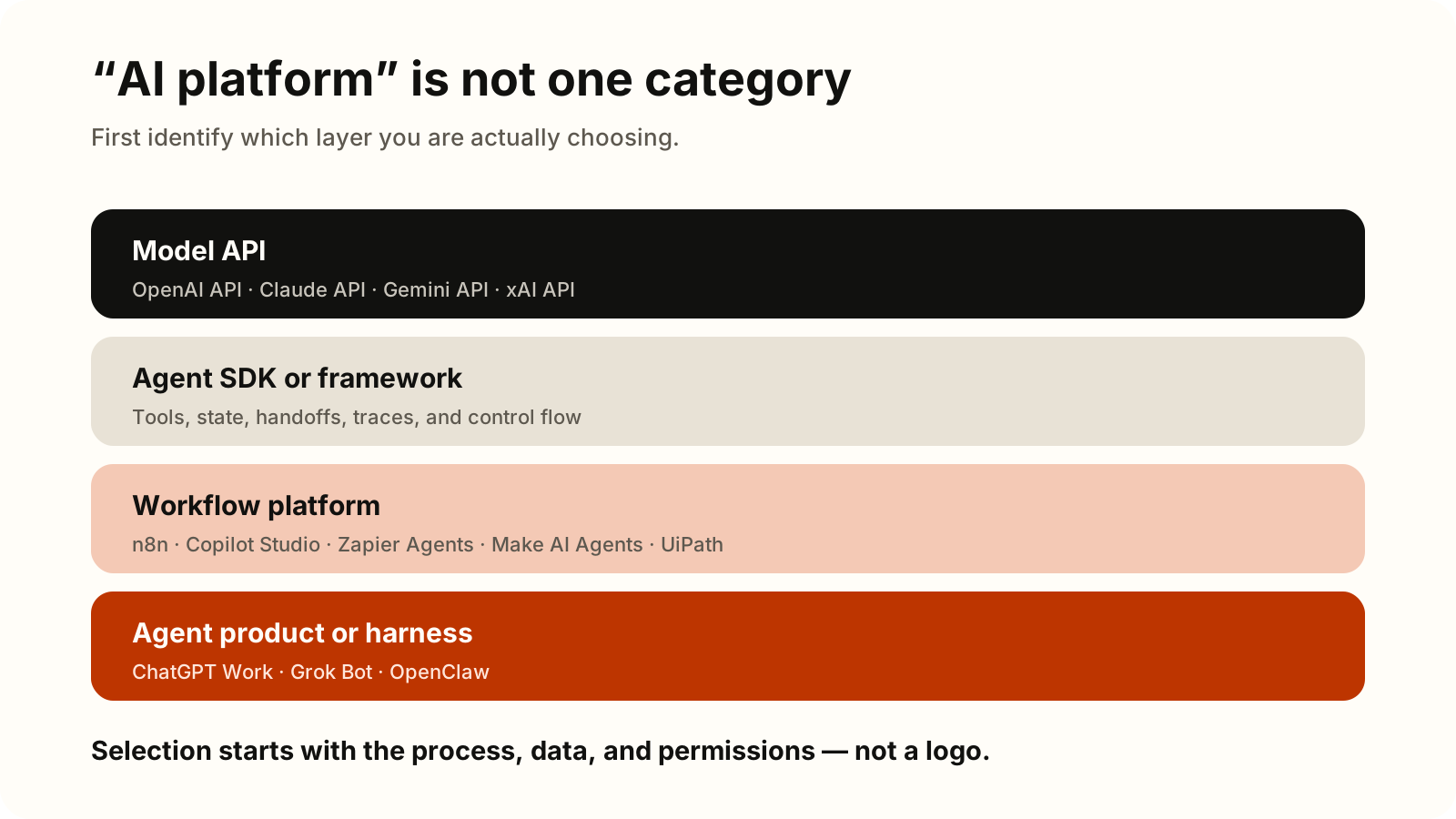
“What is the best platform for an AI agent?” is usually the wrong first question. A model that reasons, code that manages its steps, a platform that connects business systems, and a packaged product through which a user delegates work are not the same thing. They can be used together, and sometimes only one of those layers is necessary.
Start with the process instead: what outcome do you need, which data does the agent require, where may it act, and who is accountable when something goes wrong? Technology comparisons become useful only after those boundaries are clear.
For a concrete process, see how we approach AI business process automation: technology selection follows the boundaries, owner, and success measure.
1. Model APIs: reasoning capability, not the whole system
A model API accepts instructions and context, then returns text, structured output, or a proposed tool call. The OpenAI API, Claude API, Gemini API, and xAI API belong to this layer. They differ in task performance, supported modalities, latency, limits, cost, and data-handling terms.
One boundary matters: proposing a tool call is not the same as completing a business action. Your application must still validate the arguments, identity, and permissions; call the CRM or ERP; handle failure; and record what happened. Select a model by evaluating real examples from the intended process, not only by reading public benchmarks or judging a casual chat.
2. Agent SDKs and frameworks: managing the loop
When an agent needs several steps, tools, state, handoffs among specialized agents, or detailed tracing, a code layer can manage its execution loop. The OpenAI Agents SDK, Claude Agent SDK, and Google’s Agent Development Kit are examples of this approach.
These tools accelerate development, but they do not remove the engineering team’s responsibility. The team still owns deployment, state storage, secrets, retries, monitoring, tests, and approval policies. An SDK is a strong fit when you need custom behavior or a custom user experience and have people able to operate production software.
3. Workflow platforms: connecting processes and systems
A workflow platform starts from triggers, integrations, and a visible flow of work. The agent can be one step in a broader process: read a request, suggest a classification, retrieve data, prepare a draft, and then stop for human approval.
n8n combines workflows with AI components and offers a self-hosting option. Microsoft Copilot Studio provides visual creation and management of agents and workflows in the Microsoft environment. Zapier is migrating standalone Agents into AI by Zapier, where an agentic step can operate beside deterministic Zap steps, while Make AI Agent (New) places agentic work within visual scenarios. UiPath Agents connects agents with orchestration and deterministic automation.
The right decision here often follows your existing technology environment. Verify that a maintained connector exists for the actual system, every action can be traced, workflows can be versioned, data and secrets have an acceptable home, and a failed step can be retried or reversed safely. A large integration catalog does not help if the critical connector is missing or the team cannot operate the platform reliably.
For a detailed decision based on hosting, the Microsoft environment, internal systems, governance, and usage units, read the comparison of n8n vs Copilot Studio vs Make vs Zapier.
4. Packaged agent products and harnesses: an operating environment
A packaged product or agent harness already supplies an interface, execution runtime, sessions, tools, and part of the operating model. Grok Bot organizes durable work around a goal, sources, tools, an approval boundary, and a schedule. OpenClaw is a self-hosted gateway and agent environment that connects models, tools, and communication channels.
This layer can shorten the route to a useful personal or team agent, but it should not automatically replace a controlled business workflow. Evaluate isolation, permissions, memory, updates, support, auditability, and operational ownership. In particular, confirm what the agent can read, where it can send data, and which actions require confirmation.
Criteria that apply across the layers
Tie the comparison to a provable process, not a feature checklist. Answer these questions before making a shortlist:
- Outcome: Which measure should improve — processing time, manual steps, quality, or cost per case?
- Evaluation: How do candidates perform on representative examples, exceptions, and deliberately difficult cases?
- Integrations: Are stable APIs, required connectors, and a clear user or service identity available?
- Control: Can you enforce least privilege, human approval, action logs, access revocation, and recovery after failure?
- Reliability: How does the system handle latency, rate limits, outages, retries, and idempotent actions?
- Operations: Who monitors quality, incidents, model changes, instruction versions, and regressions?
- Total cost: Include licenses, tokens, integrations, hosting, observability, maintenance, and human review, not only the price of one model call.
The model and platform need not be one decision
Evaluate the model and orchestration layer separately. The same model can produce different results when instructions, tool descriptions, retrieved context, or retry policies change. One platform may also support particular models, structured outputs, and call traces differently.
Check whether a model version can be changed deliberately, configuration and logs can be exported, and switching providers would require a reasonable amount of work. You do not need an abstraction for every imagined future scenario. Create a documented substitution boundary where the business risk justifies it. After any material change to the model, tools, or instructions, rerun the evaluation set before expanding production use.
A practical selection sequence
First define one process, its boundaries, its owner, and its success measure. Then choose the orchestration layer based on the systems you already use and the team that will operate it. Only then shortlist models and run the same evaluation set against real, appropriately anonymized examples.
Begin the pilot with read-only access or mandatory approval before every change. Measure quality, speed, cost, interventions, and the consequences of errors. Expand permissions only when the evidence shows stable results and a clear stop mechanism exists.
Product names in this guide are examples of different architecture categories. They are not a ranking or a statement of partnership or certification.
Reviewed on August 31, 2026. Product names, capabilities, availability, prices, and terms change quickly. Recheck the linked official documentation before making an architecture decision and again before production rollout.