AI invoice processing automation
AI Invoice Processing Automation: eInvoices, OCR, and Review
Learn how to automate the intake, checking, and approval of incoming invoices, from eInvoices and PDFs to safe posting in your ERP.
Contents
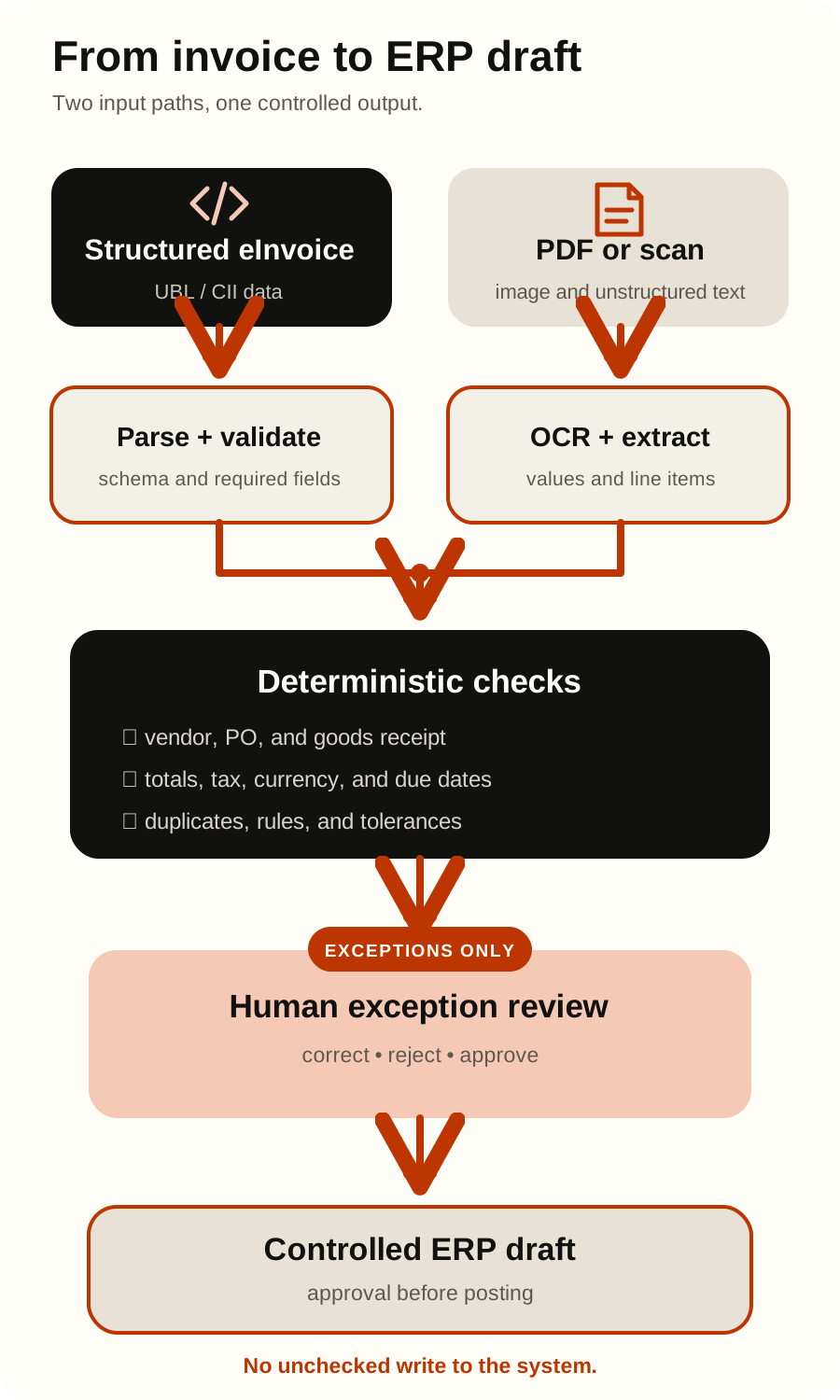
AI invoice processing automation should route each input to the right method. Parse and validate structured eInvoices as data; use layout-aware extraction for text PDFs and OCR for scans. Use AI where formats or coding choices vary, deterministic rules for calculable facts, and people for exceptions and financially sensitive approvals.
The goal is a controlled process that turns a received document into a traceable posting proposal—not a model that writes freely into the ERP. For the distinction between a conversational interface and process automation, see AI agent vs chatbot vs automation.
First distinguish eInvoices from invoice files
The European Commission defines an eInvoice as an invoice issued, transmitted, and received in a structured data format that allows automatic processing. It distinguishes eInvoices from PDFs, images, unstructured HTML, and scans. A PDF sent by email is not necessarily a structured eInvoice.
This changes the architecture. OCR is valuable for pixels, but applying it to valid structured XML discards reliable structure and introduces recognition errors. An XML parser, meanwhile, cannot understand a scanned layout.
| Incoming item | What it contains | Best first method | Appropriate AI role | Required control |
|---|---|---|---|---|
| Structured eInvoice | Machine-readable fields in an accepted syntax and semantic model | Parse the structure; validate schema, business rules, and code lists | Classify an exception or suggest an account only when rules and reference data cannot decide | Preserve the original payload and validation result; reject or quarantine invalid structure |
| Text PDF | Human-readable layout with an embedded text layer; not an eInvoice by itself | Extract text and coordinates, then apply templates or layout-aware extraction | Map variable labels and layouts into a typed candidate record | Show source evidence for each important field and run deterministic checks |
| Scan or photo | Pixels, often with skew, blur, handwriting, stamps, or compression | Image-quality checks followed by OCR or vision extraction | Resolve layout variation and propose normalized fields | Route unreadable or low-evidence fields to review; never infer missing financial facts |
| Email and attachment bundle | Message metadata, prose, links, and one or more files | Authenticate intake, identify attachments, deduplicate, and route by file type | Classify the message or document type within a constrained schema | Treat message and attachment content as untrusted data, not instructions |
The Commission’s EN 16931 registry publishes code lists, validation artefacts, and technical resources. Because these change, production validation should use a controlled version rather than assumptions copied into a prompt.
A seven-step invoice automation flow
1. Capture the invoice and its provenance
Receive invoices through defined channels. Record the channel, sender or network identifier, arrival time, message ID, attachment hash, and original file. Scan or quarantine files under your security policy. Use hashes and business keys to detect duplicates.
2. Detect the format and route it
Identify supported structured eInvoices before falling back to PDF or image processing. Validate actual content rather than trusting the extension. Route unsupported, protected, corrupt, or unexpectedly large files to exceptions. Format detection is deterministic routing logic.
3. Produce a typed candidate record
Parse structured fields directly. For text PDFs, use embedded text, coordinates, and stable templates where they work. For scans, run image checks and OCR. AI can map variable wording and layouts to supplier, invoice number, dates, currency, totals, purchase-order reference, tax details, and line items.
Return a strict schema with source page or region, extraction method, version, and available confidence. Confidence is a triage signal, not proof.
4. Run deterministic validations
Code—not a language model—should test conditions with an objectively reproducible answer. Typical validations include:
- accepted syntax and schema for structured eInvoices;
- required fields, data types, date formats, currency codes, and tax codes;
- arithmetic relationships among quantity, unit price, net amount, tax, discounts, and gross total, with documented rounding rules;
- supplier identity against approved master data, including tax identifier and permitted remit-to details;
- duplicates using attachment hash and a business key such as supplier, invoice number, date, currency, and amount;
- purchase-order, contract, cost-centre, and legal-entity references against current records;
- bank-account changes against a separate verification process, never merely against text on the invoice;
- workflow permissions, approval state, accounting-period state, and idempotency before any write.
Do not invent one global tolerance. Rounding, quantity, price, and tax differences have different risk contexts. Store tolerances as governed configuration with an owner, scope, effective date, and audit history.
5. Match against business records
Matching should compare the candidate invoice with trusted source records. Two-way matching typically compares invoice details with a purchase order; three-way matching also uses evidence of received goods or services. Invoice-total matching can compare totals across the invoice and expected records. Microsoft’s accounts-payable documentation is one example of these established matching patterns and makes clear that tolerances are configurable rather than universal.
AI can suggest a relevant contract, receipt, or cost category, but it must not fabricate evidence or override a mismatch. Show compared values on the exception.
6. Send exceptions to focused human review
The review screen should explain the stop reason, show the source beside extracted fields, highlight differences, and restrict actions by role. Supplier creation, bank-detail changes, unusual tax treatment, novel exceptions, final posting, and payment release need controls appropriate to the organisation’s risk model.
Use review decisions as evaluation data, not silent retraining. Preserve who changed what, when, and why.
7. Cross a controlled ERP write boundary
Extraction should submit a proposal to a trusted integration service. The service revalidates schema, authorization, references, version, approval, and idempotency before creating a draft or posting. Keep posting and payment as separate permissions.
If an ERP request times out, reconcile whether it succeeded before retrying. Use least-privilege identities, allowlisted operations, audit events, and links to the source. See how to connect AI agents to internal systems for the broader design.
Put rules, OCR, AI, and people on the right side of the boundary
| Capability | Use it for | Do not rely on it for |
|---|---|---|
| Deterministic rules | Schema validation, arithmetic, duplicates, permissions, reference lookups, tolerances, and routing | Interpreting genuinely variable language or unreadable images |
| OCR and document extraction | Turning visible text and layout into candidate fields with evidence | Deciding whether a transaction is legitimate or approved |
| AI model | Classifying variable documents, normalizing descriptions, and suggesting coding or matches | Final financial truth, access control, tolerance enforcement, or unconstrained ERP actions |
| Human reviewer or approver | Resolving exceptions, verifying sensitive changes, applying judgement, and accepting accountability | Re-keying every clean invoice simply because automation lacks a controlled exception path |
Use the least variable method that solves each step; ordinary code should perform exact calculations and lookups.
Treat every invoice as untrusted model input
An invoice can contain “ignore previous instructions,” hidden image text, or other model-manipulation content. OWASP identifies external files as a possible indirect prompt-injection source; impact grows with model agency and privilege.
System prompts alone are insufficient. Separate document content from instructions; constrain output to a schema; validate it in code; allowlist actions; restrict credentials; and require approval for privileged operations. The document model should not possess ERP write credentials. Test adversarial PDFs, images, multilingual instructions, links, and split-page content, and retain security logs proportionately.
An invoice supplies data to evaluate, never authority or workflow instructions.
Design privacy and retention into the flow
Invoices can contain names, contacts, signatures, bank details, and other confidential data. GDPR principles include purpose limitation, data minimisation, accuracy, storage limitation, integrity and confidentiality, and accountability. It also requires data protection by design and security appropriate to risk.
Before a pilot, document purpose and lawful basis with the privacy owner; identify roles; minimise fields; define access and deletion; review vendor terms, subprocessors, and transfer locations; and secure documents, logs, backups, and exports. Formal review requirements depend on actual processing and risk. This is not legal advice.
Run a 30-day shadow pilot before enabling writes
A shadow pilot compares automation proposals in one bounded invoice lane while the established process remains authoritative.
Days 1–5: map the lane and baseline
Choose one legal entity, intake channel, and invoice family. Map handoffs, exceptions, roles, systems, and writes. Collect representative examples across suppliers, languages, formats, credit notes, line items, and edge cases. Record cycle time, review time, corrections, exceptions, and cost from your own evidence.
Days 6–10: define the contract and controls
Specify fields, formats, rules, reference sources, matching, exception owners, roles, retention, and tests. Define per-field criteria and stop conditions. Confidence thresholds and sample sizes must reflect field risk, document diversity, and downstream decisions.
Days 11–18: build the read-only path
Implement routing, parsing or OCR, typed extraction, evidence, validation, matching, and exception explanations. Use read-only ERP reference access where possible. Do not enable writes.
Days 19–24: shadow real work
Run invoices in parallel with the current workflow. Compare proposals with approved outcomes and record failures by format, supplier, field, and version. Test duplicates, malformed files, access failures, changed master data, prompt injection, and uncertain ERP responses.
Days 25–30: decide with evidence
Review metrics, security findings, exception load, and ownership. Stop, revise, extend shadowing, or permit a narrow next phase such as approved ERP draft creation. The calendar is not a launch criterion.
To quantify the opportunity without fictional savings, use your measured baseline and the method in the AI agent cost and ROI calculator. When choosing implementation tooling, compare governance, integration, observability, and total operating fit—not a generic winner—from the automation platform comparison.
Metrics that reveal the real failure modes
Report metrics by field and slice them by input format, supplier or layout, language, and document type. Google’s Document AI evaluation guide defines precision, recall, and F1 and explains why a generic “accuracy” number is often unhelpful for optional labels and repeated fields such as line items.
- Field precision = correctly extracted field values / all extracted field values.
- Field recall = correctly extracted ground-truth instances / all ground-truth instances for the evaluated field, equivalent to
TP / (TP + FN). - F1 = 2 × precision × recall / (precision + recall), when the denominator is non-zero.
- Validation-ready rate = invoices whose required fields pass deterministic validation without correction / invoices attempted.
- Human correction rate = invoices with at least one human field correction / invoices reviewed.
- Exception rate = invoices routed to an exception / invoices attempted.
- Straight-through eligibility rate = invoices that satisfy every defined rule and approval prerequisite / invoices attempted. In a shadow pilot, this is eligibility—not actual posting.
- Duplicate interception rate = confirmed duplicates stopped / confirmed duplicates in the evaluated set.
- Median and 90th-percentile cycle time measure both the common path and the slow tail; report human review minutes separately.
- Cost per accepted invoice = model, platform, infrastructure, review, and operational costs / invoices accepted by the reference process.
Also count unauthorized write attempts, security-test failures, reconciliation incidents, and errors found after acceptance. Investigate each instead of hiding it in an average. Set criteria from risk and evidence, not a vendor benchmark or universal “99% accuracy.”
Frequently asked questions
Is a PDF invoice an eInvoice?
Not by itself. The Commission defines an eInvoice as structured data that allows automatic processing. A PDF, image, unstructured HTML document, or scan is not an eInvoice merely because it was sent electronically. In a hybrid package, validate the structured component deliberately.
Do we need AI for every invoice?
No. Prefer deterministic parsing for structured eInvoices, templates for predictable PDFs, OCR for scans, and AI only where variability justifies it. Fewer model-dependent steps simplify testing and failure handling.
Can AI post invoices directly to the ERP?
It can, but that is not the safest first design. Let the model propose; let a trusted service enforce validation, authorization, idempotency, approval, and audit. Start read-only, then consider narrowly scoped draft creation.
What extraction accuracy is good enough?
There is no universal answer. A wrong bank account, tax identifier, total, or supplier differs from a misspelled description. Evaluate by field and set criteria from the downstream decision and controls.
What is the difference between OCR and AI invoice extraction?
OCR converts visible characters into text and positions. AI can map variable text and layout into a schema or suggest classifications. Neither replaces validation, matching, approval, or source evidence.
How many invoices should a pilot include?
Use labelled examples representing formats, suppliers, languages, line-item patterns, and consequential exceptions. A homogeneous set can miss important failures. Choose coverage and stop rules instead of an arbitrary count.
Where should we start?
Start with the process, not a vendor shortlist. Define the bounded lane, evidence, rules, owners, systems, and failure cost. Soror’s AI process automation assessment can help identify a suitable first workflow and turn it into a controlled pilot plan.
Official sources
- European Commission: What is eInvoicing?
- European Commission: Registry of supporting artefacts to implement EN 16931
- Google Cloud: Evaluate processors
- Microsoft Learn: Accounts payable invoice matching
- OWASP GenAI Security Project: LLM01 Prompt Injection
- EUR-Lex: Regulation (EU) 2016/679 (GDPR)
Reviewed on August 31, 2026. This operational guide is not legal, tax, accounting, or audit advice. eInvoicing requirements, schemas, code lists, product capabilities, and official documentation change; recheck the linked official sources and obtain qualified advice for your organisation’s obligations and controls.