AI email automation
How AI Can Help Manage Business Email
AI can sort incoming messages and prepare draft replies while your team keeps control of every final decision.
Contents
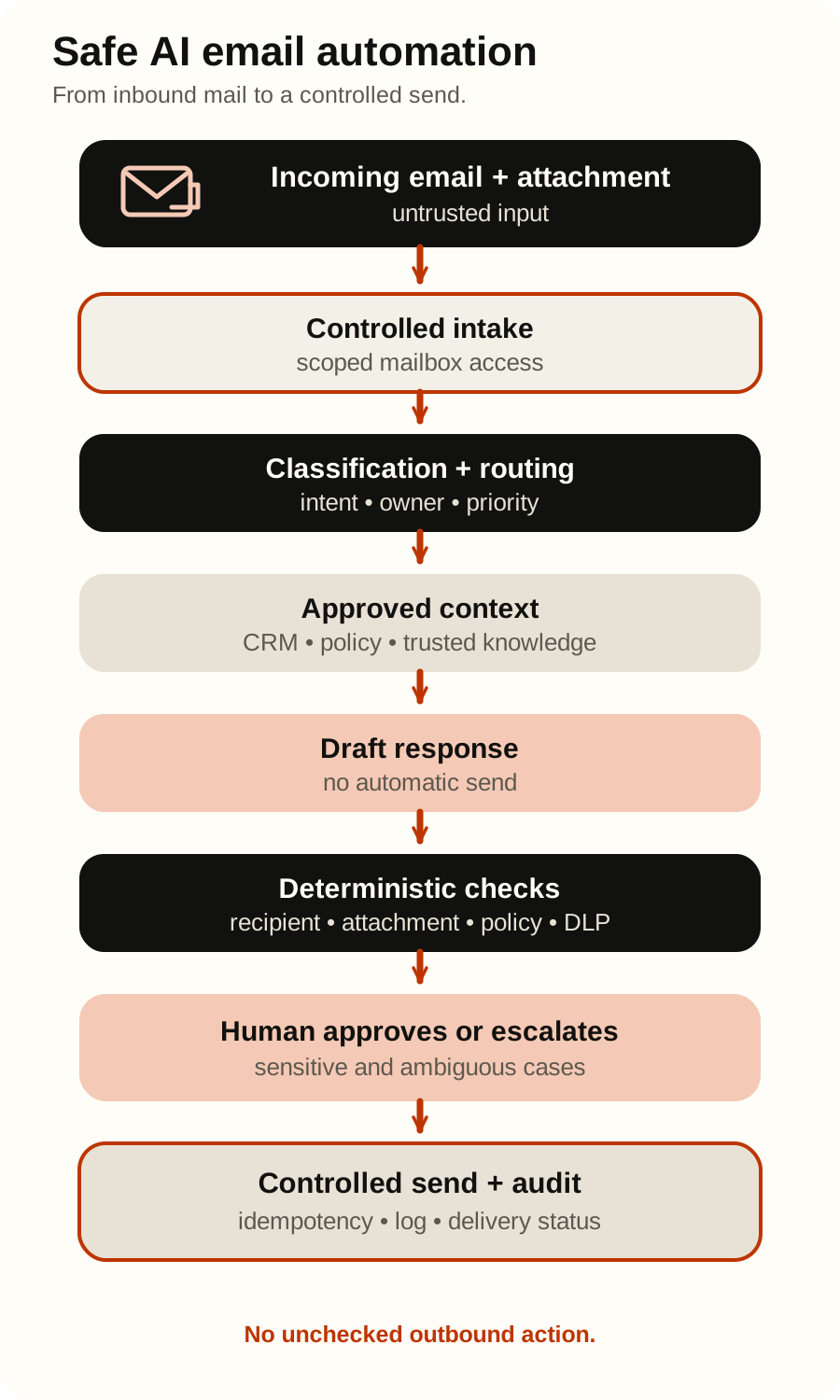
AI email automation for an incoming or shared inbox should turn each message into a typed, traceable case. Events wake the workflow, provider history reconciles the mailbox, rules enforce exact conditions, AI classifies and drafts from approved context, and people decide ambiguous or consequential cases. The safe default is draft, not send.
This is operational automation, not marketing-email automation. Its job is to assist sorting and drafting without letting untrusted messages control tools or speak for the organisation. See AI agent vs chatbot vs automation.
If the goal is to answer employees from authorised internal instructions and create an IT ticket when needed, see the dedicated AI internal helpdesk bot guide.
Define the lane before choosing a model
Start with one owned mailbox and a narrow case set, such as delivery questions or complete quote requests. Define queue owners, permitted replies, required evidence, and escalation conditions. A useful contract names what the automation handles and when it abstains; “answer every email” is not a workable scope.
| Layer | Appropriate responsibility | Keep outside it |
|---|---|---|
| Deterministic rules | Event verification, deduplication, sender and recipient checks, attachment policy, required fields, permissions, deadlines, and approval state | Interpreting genuinely variable language |
| AI | Typed intent classification, concise summaries, candidate field extraction, retrieval queries, and grounded draft proposals | Access control, policy enforcement, factual authority, and independent sending |
| Human | Ambiguous routing, sensitive claims, exceptions, relationship judgement, approvals, and accountability | Repetitive re-keying or reviewing cases that have no defined risk reason |
The model proposes; code and policy decide what is allowed; people own judgement and accountability.
A seven-step incoming-email flow
1. Use events as a wake-up signal, then synchronise
Gmail push notifications deliver mailbox changes through Cloud Pub/Sub. The notification contains an address and history ID; the application uses history.list from its last known ID to retrieve changes. Gmail watches must be renewed at least every seven days, and notifications can be delayed or dropped, so periodic reconciliation is required.
Microsoft Graph change notifications can subscribe to mailbox or inbox message changes. Graph message delta queries then retrieve added, updated, or deleted messages incrementally for a specified folder, using the returned @odata.nextLink and @odata.deltaLink URLs as state.
Verify and acknowledge events, enqueue bounded work, and advance the cursor only after durable processing. A notification says something changed; it is not the complete record.
2. Make every effect idempotent
Retries, overlapping events, restarts, updates, and timeouts must not create two cases, drafts, or sends. Store provider, tenant, mailbox, message and conversation IDs, plus the provider version or history position. Add a content hash when revisions matter.
Give each external effect its own idempotency key, for example case-id + action-type + policy-version. Before retrying after a timeout, reconcile provider state. Do not assume failure merely because the client did not receive a response.
3. Normalise into a typed case
Preserve the original and produce a small typed envelope:
case_type: a controlled enum such assupport_request,quote_request,complaint,automated_notice, orunknown;priority: a policy-defined enum, not free-form urgency;owner_queueandrequires_reply;risk_flags: account change, payment instruction, claim, personal data, suspicious link, or unsupported attachment;needed_context: approved sources required before drafting;evidence: message spans or metadata supporting the classification;abstain_reason: required when the case is unknown, conflicting, or outside scope.
Use a strict schema with required fields and explicit nullable values. OpenAI’s function-calling guide recommends strict mode for reliable schema adherence. Conformance does not prove correctness; it makes failures detectable and measurable.
4. Retrieve only approved knowledge and context
A reply may need an order status, customer record, policy, entitlement, or earlier thread. Retrieve only from named, access-controlled sources; record source and freshness; prefer read-only, case-scoped queries.
Bodies, signatures, attachments, and linked pages are untrusted evidence. They cannot redefine policy, grant access, approve a refund, or authorise disclosure. Missing or conflicting context requires a stated gap or human handoff, not plausible invention.
For the broader integration pattern, see connecting AI agents to internal systems.
5. Generate a grounded draft, not a final message
Build the prompt from the typed case, approved evidence, current policy, and permitted response shape. Separate confirmed facts from requested follow-up, and retain source pointers for review.
Draft-by-default lets the model help with wording without committing the organisation. Never turn missing context into a generic confident reply.
6. Run deterministic pre-send checks
The application—not the model—should block a draft when an exact condition fails. Re-run these checks immediately before any send because recipients, attachments, permissions, source records, and approval state can change.
- Recipients: compare
To,Cc,Bcc, reply-to, allowed domains, and the original participant set; treat reply-all as a deliberate choice. - Attachments: require the intended file, approved type, current version, scan result, size limit, and recipient entitlement; never trust the filename alone.
- Claims: flag prices, refunds, credits, deadlines, service levels, legal positions, payment details, and other commitments unless backed by an approved source and permitted template.
- Policy: confirm the case type is in scope, mandatory wording is present, prohibited content is absent, and the correct owner or approver is assigned.
- Identity and secrets: prevent disclosure of another customer’s data, internal notes, credentials, tokens, or unnecessarily copied personal data.
- Action state: confirm the message has not already been answered, the draft has not changed since approval, and the send idempotency key is unused.
These are product-specific controls. There is no universal confidence score or auto-send threshold that makes them unnecessary.
7. Handoff, approve, and cross a controlled send boundary
Show the original, classification, evidence, draft, risk flags, failed checks, and human-edit diff. Record approver, policy version, and message version; revalidate expired or changed drafts.
Separate read, draft, and send services. The send service accepts a typed request, verifies approval, re-checks recipients and policy, and writes an audit event. The model never holds a general mailbox token or unrestricted send tool.
Separate read, draft, and send permissions
Provider permissions are not identical, so design the business boundary first and then map it to the narrowest available scopes.
| Capability | Gmail API example | Microsoft Graph example | Control implication |
|---|---|---|---|
| Read and synchronise | gmail.readonly can view messages and settings; metadata-only access may fit narrower lanes | Mail.ReadBasic omits message bodies and attachments; Mail.Read is needed when the body must be read | Limit mailbox, tenant, data fields, and retention in addition to OAuth scope |
| Create or update drafts | gmail.compose manages drafts and can send, so the scope itself does not enforce a draft-only boundary | Mail.ReadWrite can create, read, update, and delete mail and explicitly does not include sending | Add service-side action allowlists and do not expose a send operation to the drafting worker |
| Send | gmail.send sends on the user’s behalf; some broader Gmail scopes also include sending | Mail.Send is distinct from Mail.ReadWrite | Put the send credential and endpoint behind approval, revalidation, rate limits, and audit |
Google advises choosing the most narrowly focused Gmail scope possible. Microsoft’s Graph permissions overview likewise recommends the minimum permission required for the operation; its permissions reference defines the mail capabilities. Application-wide or shared-mailbox permissions need especially careful scoping because their practical reach may exceed one queue.
Treat messages, links, and attachments as hostile model input
Prompt injection can arrive in visible or hidden body text, signatures, quoted history, links, PDFs, or images. It may tell an AI email assistant for business to ignore policy, search other conversations, attach confidential files, or forward data.
OWASP’s Excessive Agency guidance identifies excessive functionality, permissions, and autonomy as root causes of damaging LLM actions. Its email example recommends read-only access and manual review before send. OpenAI’s safety guidance recommends adversarial testing and human review of outputs, with access to the original evidence.
Use defence in depth:
- mark message-derived content as data and segment it from trusted policy;
- fetch only allowlisted URLs through an isolated, limited service;
- scan and parse attachments separately, returning a constrained result;
- expose only typed, case-specific tools and validate arguments and authorisation downstream;
- keep send unavailable to triage and drafting workers;
- red-team multilingual, obfuscated, link, attachment, and cross-message attacks;
- log decisions and security events without unnecessary message content.
Email transport and sender controls still matter. NIST’s trustworthy-email guidance covers sending-domain authentication through SPF, DKIM, and DMARC, transmission security with TLS, and content security with S/MIME. AI triage should consume the available security signals, not replace the mail platform’s security controls or treat an authenticated domain as proof that a request is safe.
Design privacy into the workflow
Mailbox data can contain personal, confidential, and special-category information unrelated to the chosen case. GDPR principles include purpose limitation, data minimisation, storage limitation, integrity and confidentiality, and accountability. Data protection by design and by default requires safeguards appropriate to the actual processing and risk.
Before the pilot, document purpose and lawful basis with the privacy owner; restrict mailboxes and fields; define retention for messages, prompts, outputs, traces, and backups; redact evaluations; review processors and transfers; and test deletion and access. This is not legal advice.
Measure completed cases, not impressive demos
Build a labelled set and freeze a test portion before tuning. Include common and consequential cases, languages, long threads, missing context, duplicates, attachments, and attacks. OpenAI’s agent evaluation guide recommends traces for workflow debugging, then repeatable datasets and eval runs once “good” is defined.
Use explicit formulas and publish the denominator:
- Routing precision, per queue = correctly routed labelled cases in that queue / all labelled cases routed to that queue.
- Routing recall, per queue = correctly routed labelled cases in that queue / all labelled cases that belong to that queue.
- Draft acceptance without edits = reviewed drafts approved without substantive edits / all reviewed drafts. Define whether signature, whitespace, or formatting changes count.
- Human correction time = total active minutes spent on substantive corrections / reviewed drafts that required a substantive correction. Also report median and 90th percentile so a difficult tail is visible.
- Unsafe auto-send rate = messages automatically sent without required approval or in violation of the defined send policy / all automatically sent messages. In a no-send shadow pilot the denominator is zero, so report this as not applicable and separately count blocked or attempted unsafe sends.
- Duplicate-action rate = repeated external actions for an already-used case-and-action idempotency key / all external action attempts.
- Cost per correctly completed case = model, email-provider, infrastructure, human review, support, and allocated operating cost / cases that meet the reference completion criteria.
- Abstention rate = cases explicitly returned as unknown or out of scope / cases attempted; review it alongside precision and recall rather than treating abstention as failure by default.
Slice results by case type, mailbox, language, thread length, attachment type, provider, and risk flag. Track security-policy violations and facts corrected after approval separately. There is no universal acceptable result: set release criteria from the consequence of each error and the controls around it.
Use measured volumes and labour time—not assumed savings—in the AI agent cost and ROI calculator.
A bounded 30-day shadow pilot
A shadow pilot proposes beside the authoritative human workflow; automation cannot send.
Days 1–5: scope and baseline
Choose one mailbox, a small taxonomy, and named owners. Map the flow and permissions; measure real volume, handling time, reassignments, corrections, and cost.
Days 6–10: define the contract
Label representative and held-out cases. Define schema, unknown path, approved knowledge, checks, handoffs, metric references, and forbidden actions.
Days 11–18: build read-only intake and drafting
Implement verified events, reconciliation, cursor recovery, idempotency, classification, retrieval, and drafts in a non-sending environment. Use narrow permissions; test renewals, retries, duplicates, missing history, and partial failures.
Days 19–24: shadow real cases and attack the boundaries
Compare proposals with actual outcomes and corrections. Test injection, unexpected recipients, wrong attachments, stale context, revoked access, duplicates, and simulated sends. Inspect traces for handoff and policy failures.
Days 25–30: decide from evidence
Review metrics, failures, security findings, and ownership. Stop, revise, extend shadowing, or allow a narrower phase such as mailbox draft creation. Day 30 is not a launch deadline, and auto-send is not the default next step.
If the lane or ownership is still unclear, Soror’s AI process automation assessment can turn the workflow into a bounded pilot brief.
Frequently asked questions
Is AI email automation the same as marketing automation?
No. This guide covers incoming/shared-inbox triage, context, drafts, escalation, and review. Campaigns, lead nurturing, deliverability, and bulk sending are different systems.
Can this work with both Gmail and Microsoft 365?
Yes, but event models, synchronisation, permissions, lifecycles, and shared-mailbox behaviour differ. Keep the case contract provider-neutral and implement adapters against current documentation.
Should AI ever send a reply automatically?
Not initially. Start with shadow mode and drafts. Any later auto-send lane still needs evidence and deterministic recipient, claim, attachment, permission, idempotency, and audit checks. There is no universal safe category or threshold.
How should reply-all and attachments be handled?
Treat both as deterministic policy. Compare intended recipients, flag new or external addresses, and verify each attachment’s source, version, type, scan result, recipient, and case immediately before send.
What classification accuracy is good enough?
A single accuracy percentage hides the errors that matter. Report per-queue precision and recall, abstentions, corrections, and unsafe-action attempts. Set criteria by case consequence: misrouting a newsletter is not equivalent to misrouting a security incident or sending another customer’s attachment.
Where should a company start?
Start with one clearly owned inbox lane where categories, knowledge, escalation, and outcomes can be labelled. Keep the first version read-only and draft-only, and assign an operational owner before implementation.
Official sources
- Google for Developers: Configure push notifications in Gmail API
- Google for Developers: Choose Gmail API scopes
- Microsoft Learn: Message delta query
- Microsoft Learn: Microsoft Graph change notifications overview
- Microsoft Learn: Microsoft Graph permissions reference
- Microsoft Learn: Overview of Microsoft Graph permissions
- NIST: SP 800-177 Rev. 1, Trustworthy Email
- OpenAI: Safety best practices
- OpenAI: Function calling
- OpenAI: Evaluate agent workflows
- OWASP: LLM06:2025 Excessive Agency
- EUR-Lex: Regulation (EU) 2016/679 (GDPR)
Reviewed on August 31, 2026. This operational guide is not legal, compliance, privacy, or email-security advice. Provider APIs, permissions, notification behaviour, security guidance, and regulatory requirements change; recheck the linked official sources and obtain qualified advice for your organisation’s obligations.