AI agent vs chatbot
AI Agent vs Chatbot vs Automation: Which One Fits?
Compare when you need an AI agent, a chatbot, or simple automation based on process complexity, risk, and the systems you need to connect.
Contents
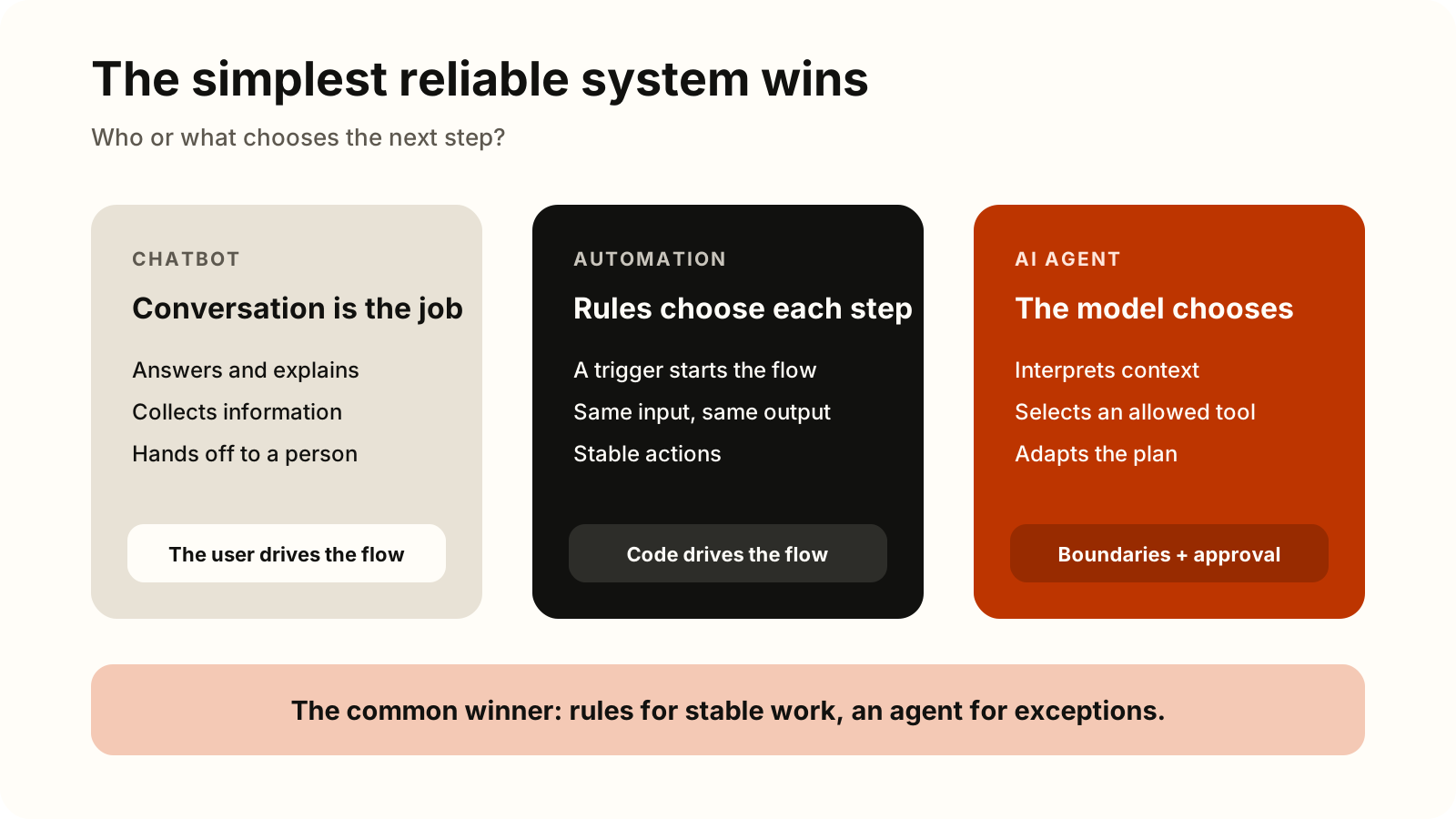
The short answer: choose a chatbot when conversation is the primary product, deterministic automation when you can define the steps and exceptions in advance, and an AI agent when the system must interpret unstructured information, select tools, and adapt a multi-step path to the situation. If reliable rules solve the problem, do not add an agent.
These are not always three separate products. Chat may be only the interface, an automation behind it may check an order, and an agent may handle the rare complex cases. The strongest design is often a hybrid: deterministic steps wherever possible, with a model only where judgment is useful.
Quick decision table
| Choose | When it fits | Example | First control |
|---|---|---|---|
| Chatbot | A user needs an answer, guided data collection, or a handoff to a person | Answer business-hours and request-status questions | State knowledge limits and provide a route to a person |
| Automation | The trigger, conditions, and actions can be specified precisely | After approval, store a document and notify its owner | Validate data, handle duplicates, and log each run |
| AI agent | The next step depends on context, unstructured documents, or a choice among tools | Investigate an order exception and prepare a proposed resolution | Least privilege, a step limit, and approval for risky actions |
| Hybrid | The process contains both predictable and unpredictable parts | Chat collects the case, an agent analyzes it, automation applies the approved change | Test the boundaries between layers |
A product label is not enough to classify a system. Some “chatbots” can call tools, while some products called agents only follow a predefined flow. Look at who or what chooses the next step and whether the system can change business data.
Anthropic’s engineering guide draws a useful technical boundary: workflows have paths predefined in code, while agents dynamically direct their own process and tool use. Google’s comparison describes the distinction through reactivity, proactivity, and autonomy. Individual products may use the terms differently, so verify the architecture by its behavior.
What is a chatbot?
A chatbot conducts a conversation: it answers questions, collects information, explains a procedure, or routes a user. The conversation can be text or voice, and responses may come from predefined intents, a knowledge base, or a generative model. In Google’s comparison, a bot is primarily reactive: a user initiates an interaction, and the system responds within its defined scope.
A chatbot is a strong choice when success is easy to define at the conversation level: the user received a correct answer, supplied complete information, or reached the right person. Conversation alone does not make a system an agent. OpenAI’s official guide to building agents distinguishes simple chatbots from systems in which a model controls workflow execution.
Do not grant a chatbot permission to modify the CRM merely because it provides a friendly interface. Start with read-only access when it needs status data. If it must initiate an action, separate user confirmation, policy validation, and execution.
What is deterministic automation?
Deterministic business process automation connects a known trigger to known conditions and actions. One example is: “When an approved form arrives, validate required fields, store the PDF, create a task, and send a notification.” Microsoft’s documentation for topics and agent flows describes them as deterministic paths: the same input should produce the same output.
Automation is usually a better choice than an agent when:
- the input has a stable structure;
- business rules can be written without ambiguity;
- each step must be consistent and easy to repeat;
- a failure must be precisely reproducible;
- a model would add variability and cost without improving the decision.
A generative model can still be one bounded step inside an automation, such as classifying free text or summarizing a document. The rest of the flow — required-field checks, authorization, posting, and notification — can remain deterministic.
What is an AI agent?
An AI agent for business uses a model to manage workflow execution: it assesses state, chooses the next step, invokes one or more tools, and knows when to finish or return control to a person. According to OpenAI’s official agent guide, an agent combines a model, tools, and instructions and is particularly relevant to complex decisions, rules that have become difficult to maintain, and unstructured data.
An agent is warranted when a single model call is not enough. For example, it may need to read a customer request, retrieve an order, compare the situation with policy, ask for missing information, prepare a recommendation, and stop before issuing a refund. The model manages the sequence, while business systems still validate identity, permissions, and allowed values.
That flexibility also expands the risk surface. A tool that reads a product catalog is not equivalent to one that changes a price, sends a message, or initiates a payment. An agent therefore needs a small set of clearly described tools, a limit on steps, and a predefined point for human approval.
Seven diagnostic questions
Take one real case and answer these questions before choosing technology:
- Is conversation itself the outcome? If the user needs an answer, guided data collection, or routing, start with a chatbot.
- Can an experienced employee write the complete decision rules? If so, automation is probably simpler and more reliable.
- Does critical information arrive in emails, documents, or free text? Unstructured input may justify a model, but not necessarily a full agent.
- Must the system choose among several tools or adapt its plan after a result? That is a strong signal for an agent.
- What is the worst acceptable error? If an action is irreversible, financial, sensitive, or legally significant, require human approval or keep the decision outside the agent.
- Can you grant narrow permissions? If an agent needs administrator access “just in case,” the process boundary is not ready.
- Do you have a baseline? Without today’s processing time, errors, rework, and cost per case, you cannot know whether the new system improved anything.
If most steps are predictable, build an automation and add AI only for the unstructured part. If conversation matters but independent actions do not, build a chatbot. Add an agent only when multi-step adaptation creates enough value to justify additional testing and control.
Three concrete business processes
1. Customer support
- Chatbot: explains shipping policy, asks for an order number, and hands the conversation to a support representative.
- Automation: after a case closes, sends a survey and applies a CRM label according to known rules.
- AI agent: for a complex claim, reads the description, retrieves the order and prior communication, compares them with policy, and drafts a proposed response. A refund remains behind validation and approval.
The practical AI email automation guide shows how triage, approved context, draft replies, and human review work in a shared inbox.
2. Incoming invoice processing
- Chatbot: tells a supplier which field or document is missing.
- Automation: validates required fields, matches the invoice to a known purchase order, and sends it through a defined approval flow.
- AI agent: investigates an exception when the description, contract, and purchase order conflict, gathers relevant records, and prepares a reasoned recommendation. Posting and payment remain deterministic, authorized actions.
The detailed AI invoice processing automation guide separates structured eInvoices, OCR, AI judgment, controls, and human approval.
3. Internal IT requests
- Chatbot: helps a user find instructions and collects the device, error message, and urgency.
- Automation: opens a ticket, assigns a queue, and notifies the on-call person based on category.
- AI agent: for permitted cases, checks several sources, proposes diagnostic steps, and summarizes findings. Access changes, data deletion, or production intervention require explicit authority and approval.
These patterns show why an agent does not replace every automation. It handles the part of a process where context and exceptions matter, while stable steps remain rule-based.
Safety: permissions should grow more slowly than capability
Make the first pilot read-only, or require confirmation before every change. Then add layers of control:
- a separate service identity with least privilege;
- an allowlist of tools and validation of every argument before invocation;
- explicit approval before sending, deleting, paying, or taking another hard-to-reverse action;
- limits on steps, cost, and retries;
- logs of inputs, instruction versions, tool calls, decisions, approvals, and outcomes;
- safe retry behavior, a stop mechanism, and a handoff to a person;
- data minimization and clear retention and access rules for logs.
These controls do not replace the security of the underlying business systems. OpenAI’s guide recommends layered guardrails, standard authentication and authorization, and human intervention for high-risk actions. The NIST AI Risk Management Framework also emphasizes defined roles, oversight, and measurement throughout the AI system lifecycle.
Current OpenAI documentation shows how tool calls can be constrained with a structured schema and an allowed subset of tools, while its remote MCP guidance describes approval before sensitive data sharing or action. Those are concrete mechanisms from one provider, not substitutes for your own threat model and business controls.
Measurement: compare the process, not the demo
Before the pilot, record a baseline on a representative sample of real cases. Then compare the same type of work with the new system:
- total time from request to outcome;
- minutes of human effort per case;
- share of cases completed successfully;
- errors, rework, and escalations;
- cost per case, including human review;
- outcome quality against a predefined rubric;
- security incidents and attempted actions outside permission boundaries.
The evaluation set should include normal cases, edge cases, missing data, conflicting instructions, and expected integration failures. One convincing conversation is not enough. Rerun the evaluation when the model, instructions, tool, or business rule changes, and track production outcomes separately from laboratory tests.
For agent systems, a trace of the entire run is also useful. OpenAI’s agent evaluation documentation covers model and tool calls, guardrails, and handoffs, making it possible to detect wrong tool selection and regressions that the final message alone may hide.
Recommended sequence
- Describe one process from input to measurable outcome.
- Remove unnecessary steps before automating anything.
- Automate stable rules.
- Add a chatbot when conversation is a real user need.
- Add an agent only for decisions and exceptions that rules do not handle well.
- Run a small pilot with narrow permissions and a named owner.
- Expand scope only when measurement shows a better result without unacceptable risk.
For a deeper implementation path, read how to build an AI agent for a business process. If you want to classify the processes in your company and select a first use case with measurable impact, start with an AI process automation assessment.
Sources
- Anthropic — Building effective agents
- Google Cloud — What are AI agents?
- Microsoft Learn — Agent flows and cloud flows FAQ
- OpenAI — A practical guide to building agents
- OpenAI — Function calling
- OpenAI — Connectors and remote MCP servers
- OpenAI — Agent evals
- NIST — AI Risk Management Framework Core
Reviewed on August 31, 2026. Product capabilities and official documentation change; recheck the linked sources before an architecture or production decision.